
Most people spend between six and ten hours a day in a chair without giving much thought to how they sit. That is understandable – when you are focused on work, posture rarely feels urgent. But the way you sit directly affects how your body holds up over time, and the effects of poor posture accumulate quietly until they become hard to ignore.
Back pain, neck stiffness, numb legs, and persistent fatigue are not random complaints for desk workers. In the majority of cases, they trace back to a consistently poor sitting position. The good news is that improving your posture does not require expensive equipment or complicated habits. It mostly requires understanding what the correct sitting position looks like and making a few deliberate adjustments.
This guide breaks down proper desk posture from the ground up, explains why each element matters, and gives you practical steps you can apply immediately.
Why Proper Sitting Posture Matters
Posture affects far more than how you look from across the room. When you sit incorrectly for long stretches, your muscles, joints, and circulatory system all pay a price. The consequences tend to build gradually, which is why many people dismiss early warning signs until the discomfort becomes persistent.
Reducing Physical Discomfort
Sitting in a poorly aligned position places uneven stress on the spine and surrounding muscles. When the lower back loses its natural curve and the shoulders roll forward, certain muscle groups have to work harder than they should just to hold the body upright. Over time, those muscles fatigue, tighten, and eventually cause pain.
This is why the end of a long workday often brings soreness in the neck, upper back, or lower back – not because you were physically active, but because you held a strained position for hours. Good posture distributes your body weight more evenly so no single area carries a disproportionate load.
Supporting Healthy Blood Circulation
How you sit affects how blood moves through your lower body. When the knees are bent too sharply, the thighs are pressed against the seat edge too firmly, or the feet are left unsupported and dangling, blood flow to and from the legs can become restricted.
Restricted circulation in the legs often shows up as tingling, numbness, or a heavy feeling in the feet and calves during or after long sitting sessions. If you notice these symptoms regularly, your sitting position – including how your legs and feet are supported – is worth examining. For a deeper look at why this happens, this article on how to prevent leg numbness while sitting at a desk explains the underlying mechanics in detail.
Improving Productivity and Focus
There is a practical performance angle to posture that often gets overlooked. When the body is uncomfortable, attention splits between the task at hand and the discomfort. Studies on workplace ergonomics consistently find that workers who sit in well-supported positions report better concentration and fewer distractions from physical discomfort.
Proper posture also supports better breathing. Slouching compresses the diaphragm slightly, reducing lung capacity. Sitting upright allows fuller, more relaxed breaths, which keeps oxygen delivery to the brain steady during long work sessions.
Preventing Long-Term Musculoskeletal Strain
Occasional poor posture is not a major concern for most healthy adults. The problem is repetition. Sitting in a misaligned position day after day, year after year, creates cumulative stress on the spine, hip joints, and soft tissue structures. Conditions like chronic lower back pain, cervical disc issues, and hip flexor tightness are frequently linked to sustained poor sitting habits.
According to Mayo Clinic’s guidance on sitting and lower back health, the way you position yourself while seated has a meaningful impact on spinal health over time. The key point is that no single sitting session causes lasting damage – it is the accumulated pattern that matters.
What Is the Correct Sitting Position for All-Day Desk Work?
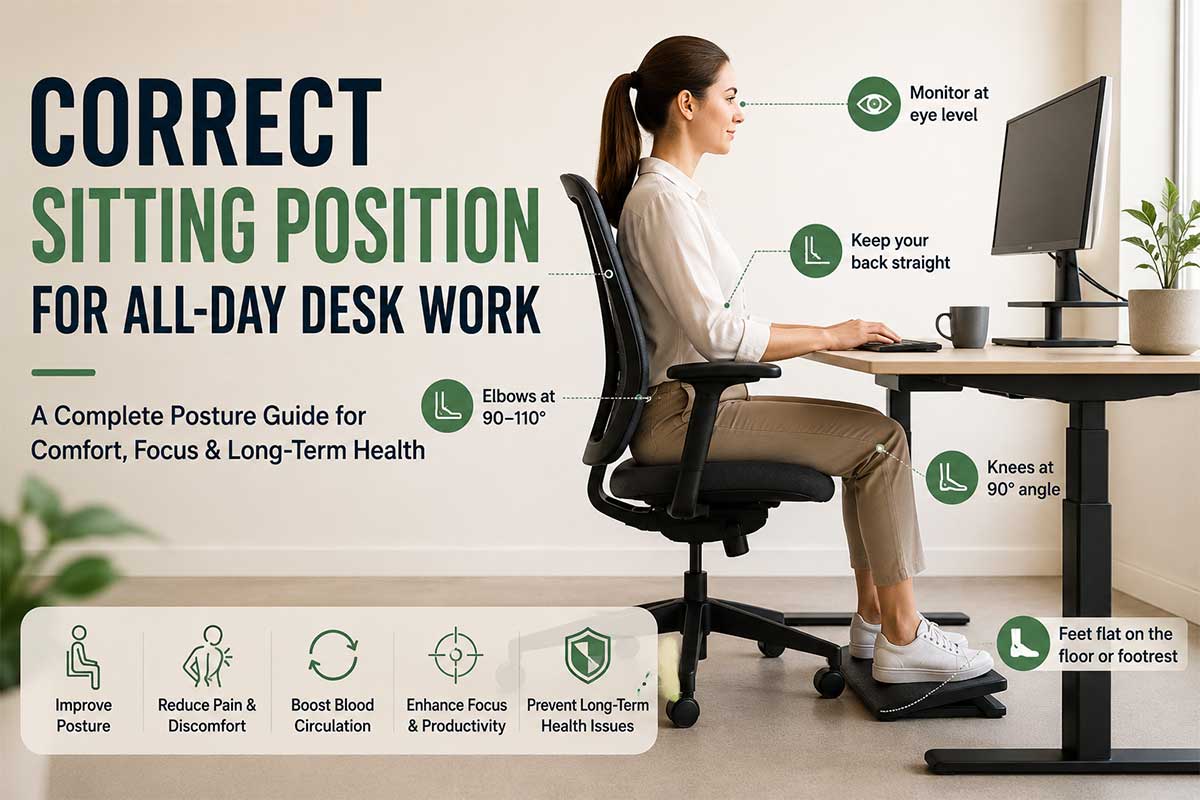
There is no single perfect position that works for every body type, but there is a well-established framework based on neutral joint alignment. The goal is to keep the major joints – ankles, knees, hips, elbows – at comfortable, non-strained angles while keeping the spine in its natural curve.
Here is how that translates in practice.
Keep Your Feet Properly Supported
This is where correct posture begins, not with the back or the neck. If your feet are not supported, the rest of the chain is compromised.
Your feet should rest flat on the floor or on a firm, stable surface. They should not dangle, and they should not be tucked under the chair. When the feet have no support, the weight of the legs pulls downward, increasing pressure on the backs of the thighs and the lower lumbar region.
If your chair height means your feet do not reach the floor comfortably, a footrest solves this directly. Proper foot support also keeps the knees at the right angle, which is the next element in the chain.
Position Your Knees and Hips Correctly
The knees should be at roughly a 90-degree angle, with the thighs approximately parallel to the floor or angled very slightly downward. The backs of the knees should not be pressing hard into the seat edge. If the seat is too long for your leg length, the front edge of the seat will cut into circulation behind the knees.
The hips should sit at or slightly above knee level. Sitting with the hips lower than the knees tilts the pelvis backward and flattens the lumbar curve, which is a common cause of lower back discomfort in long sitting sessions.
Maintain a Neutral Spine
The spine has three natural curves – cervical (neck), thoracic (mid-back), and lumbar (lower back). Correct sitting posture preserves those curves rather than exaggerating or flattening them.
For the lower back specifically, the lumbar curve should be gently supported, either by the chair’s lumbar support or by a small cushion placed in that region. Avoid sitting at the very front of the seat where the back is fully unsupported, and avoid slumping against the backrest so that the lower back rounds outward.
The head should sit directly over the shoulders, not pushed forward toward the screen. For every inch the head moves forward from its neutral position, the effective load on the neck increases significantly. This forward-head posture is one of the most common contributors to neck and upper shoulder pain in office workers.
Relax Your Shoulders
The shoulders should sit naturally at rest, not raised toward the ears or rounded forward. Tension in the shoulder area is often caused by armrests that are set too high (which push the shoulders up) or too low (which cause the shoulders to drop and the upper back to curve).
If your chair has armrests, position them so your forearms rest lightly on them without lifting the shoulders. If the armrests are too high or wide to allow a relaxed shoulder position, it is often better to remove them or not use them.
Keep Your Elbows at a Comfortable Angle
The elbows should be at approximately 90 to 110 degrees when typing. The forearms should rest roughly parallel to the floor or angled very slightly downward toward the keyboard. Reaching forward for the keyboard or mouse is a common habit that strains the wrists, forearms, and upper back over time.
Keep the keyboard close enough that the upper arms hang naturally by the sides rather than extending forward. The mouse should sit at the same height as the keyboard, and close enough that reaching for it does not require extending the arm significantly.
Position Your Monitor Correctly
Monitor height and distance are part of the sitting posture equation because they directly drive head and neck position. The top of the screen should be at roughly eye level or slightly below it. If the screen is too low, you will tilt the head downward for hours, stressing the cervical spine. If it is too high, the head tilts backward, which is equally problematic.
The screen should be at arm’s length – roughly 50 to 70 centimeters from the face, depending on screen size and your eyesight. If you frequently lean toward the screen to see it clearly, consider adjusting the font size or display settings rather than moving the monitor closer, as leaning forward undermines the entire spinal alignment you have set up.
Common Sitting Posture Mistakes People Make
Understanding what not to do is just as useful as knowing the correct position. These are the most common errors, and most people make at least one of them without realizing it.
Slouching Forward
Slouching is the most prevalent posture problem. It involves the lower back rounding outward, the pelvis tilting back, and the upper body collapsing toward the desk. In this position, the lumbar curve disappears, and the head tends to drift forward.
The problem with a slouched position is that it feels comfortable in the short term. The muscles are not working to hold the posture, so there is no immediate tension. But the joints and ligaments of the spine are under constant passive stress, and after hours of this, muscle fatigue and pain follow.
Crossing Legs for Long Periods
Crossing the legs at the knees is a common sitting habit, especially when trying to get comfortable. Occasionally crossing the legs is not a significant problem. Maintaining it for extended periods, however, can create uneven pressure through the pelvis, tighten the hip flexors on one side, and restrict circulation in the lower leg.
If you habitually cross your legs, it often signals that the chair height or foot support is off. When the feet are well supported, there is less urge to shift the legs around.
Leaning Toward the Screen
Leaning toward the monitor – whether from a too-distant screen or deteriorating visual comfort – places the head forward of the shoulders and collapses the chest. This creates a chain reaction: the upper back rounds, the lower back loses its curve, and the neck and shoulder muscles work overtime. Even leaning forward by a few inches, sustained for hours, generates significant muscular fatigue.
Sitting Without Foot Support
When the feet dangle without touching the floor, the weight of the legs places pressure on the undersides of the thighs where they contact the chair. This compresses blood vessels and nerves in that area, which is a direct cause of the numbness and fatigue many desk workers experience in the afternoon. Supporting the feet removes that pressure and allows the legs to rest in a neutral, supported position.
This issue is particularly common for shorter individuals whose chairs are set to accommodate taller users. Adjustable-height footrests can bridge that gap effectively.
Working for Hours Without Moving
Even a biomechanically perfect sitting position becomes a problem if it is held completely still for hours. The body is designed to move. Prolonged static posture – even good posture – reduces circulation, allows muscles to stiffen, and increases fatigue in the stabilizing muscles of the back and core.
Changing position slightly, standing briefly, or taking short walks every 30 to 45 minutes matters more than most people expect. Movement is not a break from good ergonomics – it is part of it.
How a Footrest Can Support Better Sitting Posture
A footrest is often treated as an accessory rather than an ergonomic tool, but it plays a meaningful role in the overall sitting posture chain.
When the feet rest flat on a footrest at the correct height, the knees stay at approximately 90 degrees. The thighs remain roughly parallel to the floor, which keeps the hips at the right angle. That hip position, in turn, supports the natural lumbar curve rather than flattening it. Remove the foot support, and that entire alignment can shift.
For shorter individuals especially, foot support is not optional. Most office chairs and desks are designed around average male body proportions, which means many people are sitting with feet partially or fully unsupported without realizing it. A footrest corrects this without requiring chair or desk adjustments.
Beyond alignment, a footrest reduces the compressive pressure on the backs of the thighs. That reduction in pressure directly supports circulation in the legs, which is why footrests are often recommended as part of strategies to address leg fatigue and numbness during desk work. There is more detail on this connection in the article on how to reduce leg fatigue while sitting at a desk.
Some footrests also allow gentle foot rocking or tilting, which encourages small movements in the ankles and calves throughout the day. That low-level muscular activity helps pump blood back up through the legs, reducing the pooling effect that contributes to that heavy or swollen feeling after long sitting sessions. The evidence for this is discussed in more detail in do footrests improve blood circulation while sitting.
For a broader overview of the ergonomic case for foot support, the article on benefits of using a footrest under desk covers the key points. And if you are figuring out the right elevation for your setup, the guide on how to choose the right footrest height for better desk comfort walks through the measurement process.
Additional Tips for Maintaining Good Posture Throughout the Day
Setting up the correct position in the morning is a start. Maintaining it for the rest of the workday requires a few supportive habits.
Take Short Movement Breaks
Aim to stand, stretch briefly, or walk for one to two minutes every 30 to 45 minutes. This does not need to be a formal break. Refilling a water glass, walking to a colleague’s desk, or standing during a phone call all count. Frequent micro-breaks prevent the muscle fatigue and stiffness that accumulate when any position is held too long.
Setting a low-interruption timer or using a simple movement reminder on your phone can help build this habit without disrupting workflow.
Stretch Regularly
Targeted stretching for the areas most stressed by sitting – the hip flexors, chest, neck, and lower back – can significantly reduce accumulated tension. Even a two-minute stretching routine two or three times during the workday makes a difference over weeks of consistent practice.
A chest opener (clasping hands behind the back and gently lifting) counteracts the forward shoulder position. A simple seated hip flexor stretch helps offset the tightening that builds when the hips stay in a flexed position for hours. Neck side tilts address the tension that builds in the upper trapezius from prolonged forward-head posture.
Adjust Your Workspace Setup
Poor posture is often a compensation for a workspace that is not set up correctly. If the chair is too high, the desk too low, or the monitor in the wrong position, even the most disciplined person will drift into poor alignment because the environment is pulling them there.
Take fifteen minutes to review the setup systematically: chair height first, then foot support, then desk height, then monitor position. Small adjustments to each of these can eliminate the need to consciously fight bad posture habits all day.
Alternate Sitting and Standing When Possible
A sit-stand desk arrangement, or even a standing desk converter, allows you to alternate between sitting and standing throughout the day. Standing shifts the load from the sitting muscles to the standing ones, breaks up hip flexor tightness, and tends to encourage more micro-movement naturally.
The goal is not to stand all day – that creates its own set of problems. A loose pattern of sitting for 45 to 60 minutes, then standing for 15 to 20 minutes, is a reasonable starting point that most people find sustainable.
Signs Your Current Sitting Position Needs Improvement
Sometimes the clearest feedback comes from the body itself. These are common signals that the current sitting setup is causing cumulative stress.
Recurring lower back ache by mid or late afternoon. This often indicates that the lumbar region is not being supported through the day, or that the hip angle is placing the spine in a persistently flexed position.
Neck and upper shoulder tension that builds as the day goes on. Forward-head posture and rounded shoulders are typically behind this. It tends to worsen with screen distance and monitor height issues.
Numbness or tingling in the feet, legs, or hands during or after sitting. Numbness in the legs often points to circulation being restricted at the thighs or knees. Tingling in the hands can signal wrist position or nerve compression from improper arm support.
Fatigue in the mid-back. When the thoracic spine is not properly supported, the erector muscles in that region work continuously to maintain upright posture, eventually producing a burning or heavy fatigue sensation.
A tendency to slide forward in the chair. If you find yourself slouching into the chair’s front edge by late morning, the lumbar support may be in the wrong position, or the chair angle may be pushing you forward.
Headaches that start in the afternoon. These can have many causes, but tension headaches that begin at the base of the skull are frequently linked to neck posture and sustained muscle tension in the upper trapezius.
If several of these apply regularly, a methodical review of the sitting setup is warranted before the issues become more persistent.
Frequently Asked Questions
What is the correct sitting position for long hours at a desk?
The ideal position involves feet flat on the floor or a footrest, knees at roughly 90 degrees, hips at or slightly above knee level, the lower back supported in its natural curve, shoulders relaxed, elbows at 90 to 110 degrees, and the monitor top at approximately eye level. The goal is neutral joint alignment throughout the body.
How often should I adjust my sitting position during the day?
Rather than holding any single position for long stretches, aim to make small adjustments frequently – shifting weight slightly, changing the angle of the backrest occasionally, or alternating between sitting and standing. Taking a brief movement break every 30 to 45 minutes is more effective than trying to maintain a rigid “perfect” position all day.
Can sitting incorrectly cause permanent damage?
Occasional poor posture does not cause permanent injury in most healthy adults. But sustained poor posture over months and years contributes to chronic musculoskeletal problems, including disc degeneration, hip flexor tightness, and chronic back and neck pain. The concern is the cumulative pattern, not any single session.
Why do my feet go numb when I sit at my desk?
Foot or leg numbness during desk work usually indicates circulation restriction, often caused by the thighs pressing against the seat edge, feet left unsupported and dangling, or the knees bent at too sharp an angle. Ensuring the feet are properly supported and the seat is not compressing the back of the thighs tends to address this.
Is it bad to sit with legs crossed at the desk?
Crossing the legs occasionally is not harmful. However, maintaining a crossed-leg position for long periods can create pelvic imbalance, restrict circulation in the lower leg, and tighten the hip flexors unevenly. If you find yourself frequently crossing your legs for comfort, it may indicate that the seat height or foot support needs adjustment.
Does sitting upright all day cause its own problems?
Holding any posture, including a correct one, completely still for hours creates muscle fatigue and reduces circulation. Good posture works best when it is combined with regular micro-movement, short breaks, and occasional position changes throughout the day. Static upright sitting for many hours straight is better than slouching but still less healthy than a mix of positions and movement.
What role does monitor height play in sitting posture?
Monitor height directly drives head and neck position. A screen that is too low causes persistent downward head tilt, increasing load on the cervical spine. A screen that is too high causes the head to tilt backward. Both positions create neck and shoulder strain over time. The monitor top should sit at approximately eye level, with the screen at arm’s length.
How do I know if my chair height is correct?
When seated with feet flat on the floor or footrest, the thighs should be roughly parallel to the floor with the knees at approximately 90 degrees. The hips should be at or slightly above knee height. If achieving this requires the feet to dangle, the chair is too high and a footrest is needed. If the knees rise above hip level, the chair is too low.
Final Thoughts
Correct sitting posture for all-day desk work is not about achieving a rigid, static position. It is about keeping the body’s major joints in neutral, supported alignment so that no single area is carrying more stress than it should. Feet supported, knees and hips at sensible angles, lower back in its natural curve, shoulders relaxed, elbows at a comfortable position, and the monitor at eye level – these are the building blocks.
Small adjustments to a workspace setup can eliminate hours of accumulated discomfort each week. Combined with regular movement breaks and a habit of noticing when the body is signaling strain, proper posture becomes less of a discipline to maintain and more of a natural baseline. The body responds well to consistent, reasonable conditions. Give it the right support structure, move regularly, and the common complaints of desk work – the afternoon backache, the numb legs, the persistent neck tension – tend to diminish over time.
1 thought on “Correct Sitting Position for All-Day Desk Work”